HY300 Projector Review: A Surprisingly Capable Entry-Level Portable Android Projector
The HY300 projector is an ultra-budget portable Android projector that promises a big-screen experience at a surprisingly low price. This review explores how the HY300 performs in real-world conditions, covering image quality, brightness limitations, Android 11 features, connectivity, and practical use cases. Rather than focusing on specifications alone, the article explains who this projector is actually for, where it excels, and where its compromises become noticeable, helping readers decide whether it fits their needs.
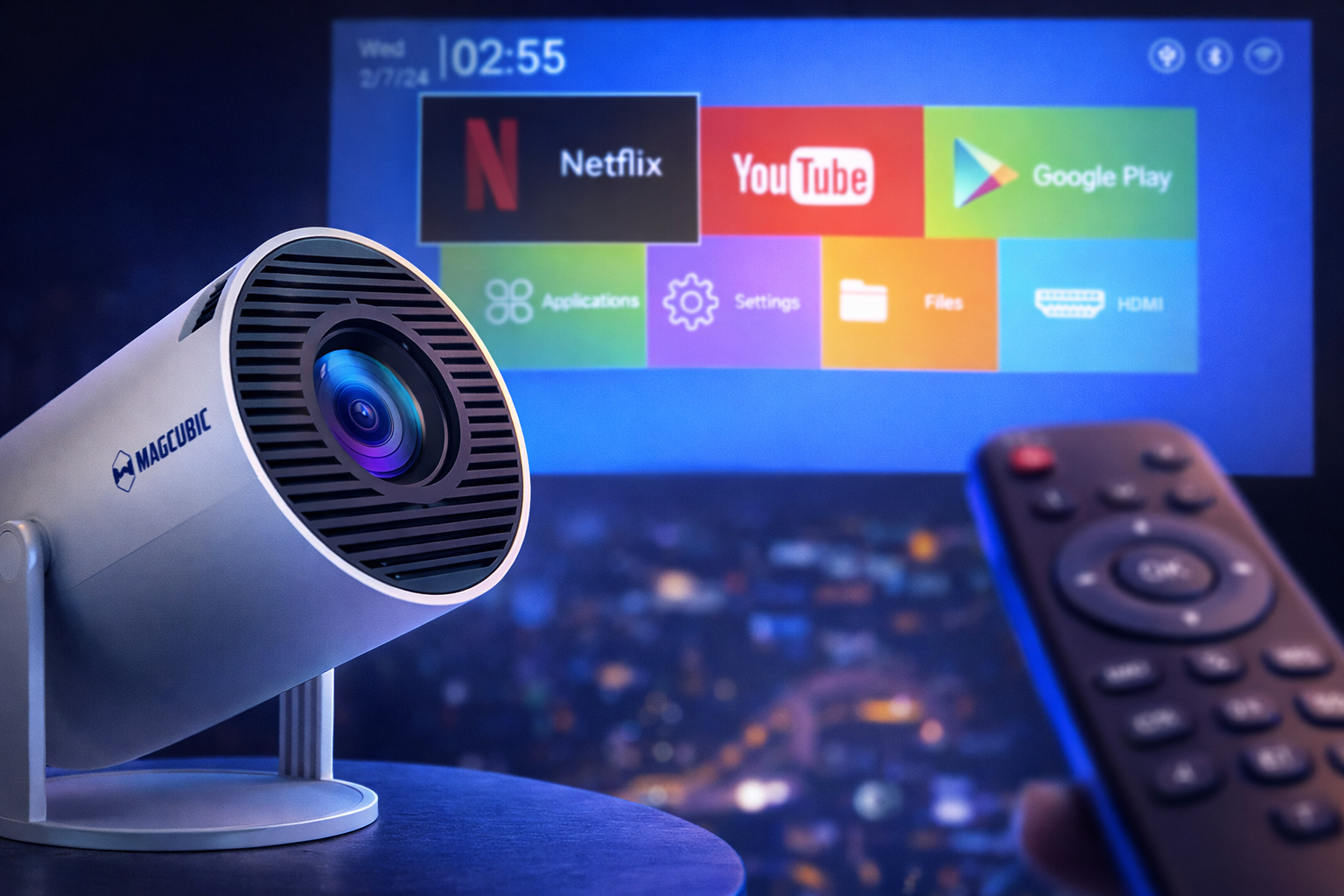
Marketed under different brand names worldwide, the HY300 (sometimes referred to as Magic Cubic HY300) is a portable 720p LED projector running Android 11, equipped with Wi-Fi 6 and Bluetooth 5.0. On paper, the specifications almost sound too good to be true for a projector that often sells well below €100.
This review takes a realistic and experience-based approach. Instead of focusing on marketing claims, we analyze how the HY300 performs in real-world conditions, what it does well, where it clearly shows its limitations, and who should actually consider buying it.
Design and Build Quality
One of the first things that stands out about the HY300 is its size. Measuring roughly 19 cm in length, 9 cm in diameter, and weighing around 600 grams, it is genuinely portable. This makes it easy to move between rooms or take outdoors for casual movie nights.
The cylindrical design allows for vertical projection, including ceiling projection, which is especially useful for bedroom setups. The projector remains well-balanced and does not tip forward or backward, even when tilted.
There is no autofocus system, but the manual focus wheel located on the top is easy to use and responsive. Build quality is basic but acceptable for the price. The housing is plastic, yet solid enough for everyday use.
Ports and Connectivity
Connectivity on the HY300 is kept minimal, but functional:
- HDMI 1.4 input
- USB 2.0 port
- 3.5mm audio jack
- Infrared receiver for the remote control
- Dedicated power input (220V)
Wireless connectivity is surprisingly modern for a budget projector. The HY300 includes Wi-Fi 6 for faster and more stable streaming and Bluetooth 5.0 for connecting speakers, headphones, or controllers.
Android 11 Experience and Smart Features
The HY300 runs a customized version of Android 11, giving users access to popular streaming apps such as Netflix, YouTube, and the Google Play Store. While Netflix is available, it typically runs in standard definition rather than full HD due to DRM limitations common on budget projectors.
System navigation is fairly responsive, especially considering the low-cost hardware. The interface is usable, but users looking for maximum smoothness may still prefer connecting an external device such as a Chromecast or Fire TV Stick.
The projector also supports:
- Automatic and manual keystone correction (vertical)
- Digital zoom to reduce image size without moving the projector
- Screen orientation adjustment for ceiling projection
- Basic application management and uninstall options
Image Quality and Projection Performance
The HY300 uses a native 1280 × 720 (720p) LCD panel and is capable of decoding 1080p and even 4K video files, which are downscaled to the projector’s native resolution.
Brightness is rated at around 200–290 ANSI lumens, depending on the seller. In practice, this means the projector is only suitable for use in dark or very dim environments. Daylight viewing or bright rooms will result in a washed-out image.
When used correctly (dark room, appropriate distance), the image is surprisingly pleasant:
- Good sharpness in the center of the image
- Slight softness in the corners, typical of LCD projectors
- Acceptable contrast for bright scenes
- Colors are natural but not vibrant
Animated content, cartoons, and brightly lit movies perform especially well. Dark films and high-contrast scenes reveal the limitations of brightness and black levels.
Audio Performance
The built-in speaker is functional but modest. It is loud enough for a small bedroom but lacks bass and overall depth. Fan noise is present but relatively controlled compared to many LCD projectors in this price range.
For a better experience, connecting an external Bluetooth speaker or soundbar is strongly recommended.
Gaming and Input Lag
The HY300 is not designed for gaming, but casual play is possible. Input lag is noticeable, especially in fast-paced games like FPS titles. Slower games or turn-based experiences remain playable.
This projector should be considered entertainment-first, not gaming-focused.
Who Is the HY300 Projector For?
The HY300 makes sense for specific use cases:
- First-time projector buyers
- Bedroom or casual movie setups
- Occasional outdoor movie nights
- Users on a very limited budget
It is not suitable for bright living rooms, professional presentations, or users expecting TV-level image quality.
Pros and Cons
Pros
- Extremely affordable price
- Compact and portable design
- Android 11 with Play Store access
- Wi-Fi 6 and Bluetooth 5.0
- Decodes 4K video files
Cons
- Low brightness, unusable in daylight
- Native resolution limited to 720p
- Average built-in speaker
- No autofocus
- Input lag not suitable for serious gaming
Final Verdict
The HY300 projector is a clear example of how far ultra-budget projectors have come in recent years. For its extremely low price, it delivers a surprisingly usable big-screen experience—as long as expectations are set correctly. In dark environments, such as a bedroom or during casual nighttime movie sessions, the image quality is enjoyable enough for movies, cartoons, and streaming content.
Its built-in Android 11 system, Wi-Fi 6 support, and Bluetooth connectivity make it especially appealing to first-time projector buyers who want an all-in-one solution without relying on external devices. However, the HY300’s low brightness, 720p native resolution, and average audio performance mean it cannot replace a television or a higher-end projector.
In real-world use, the HY300 works best as a secondary entertainment device rather than a main home cinema setup. If you are on a tight budget, understand its limitations, and primarily plan to use it in dark rooms, the HY300 offers solid value for the price. For users expecting high brightness, sharp Full HD visuals, or gaming-grade responsiveness, investing in a more capable projector would be the better choice.